Offset documentation · All guides
Get started with Offset
Install your theme, shape your front page, and publish your first stories.
Offset is an editorial magazine theme for Ghost. Your articles, public tags, featured posts, and Ghost settings supply its content. You do not need a Content API key, a page builder, or a frontend build step to use it.
This guide covers Offset 1.0.0, checked against the theme source and its live Ghost administration on 18 October 2026. Screenshots show the demo publication; its articles and artwork are examples, not content included with the theme.
Before you begin
You need a Ghost publication running Ghost 6.x, a staff account with permission to upload themes and change settings, and the installable Offset ZIP. The current theme package declares compatibility with Ghost 6.0.0 up to, but not including, 7.0.0. If your hosting plan restricts custom themes, check that it permits uploading a third-party theme before proceeding.
For paid memberships, Ghost also needs a connected Stripe account. Login emails and newsletters depend on your Ghost email configuration. Installing a theme does not configure those services.
Set up your publication
- Install and activate Offset, keeping a backup of your previous theme.
- Add your branding and navigation.
- Publish articles with feature images, excerpts, author profiles, and public tags.
- Mark selected posts as Featured to populate the editor’s dispatch.
- Configure the homepage and review all theme settings.
- If you accept subscribers, configure memberships and newsletters.
- Follow the launch checks.
Understand the front page
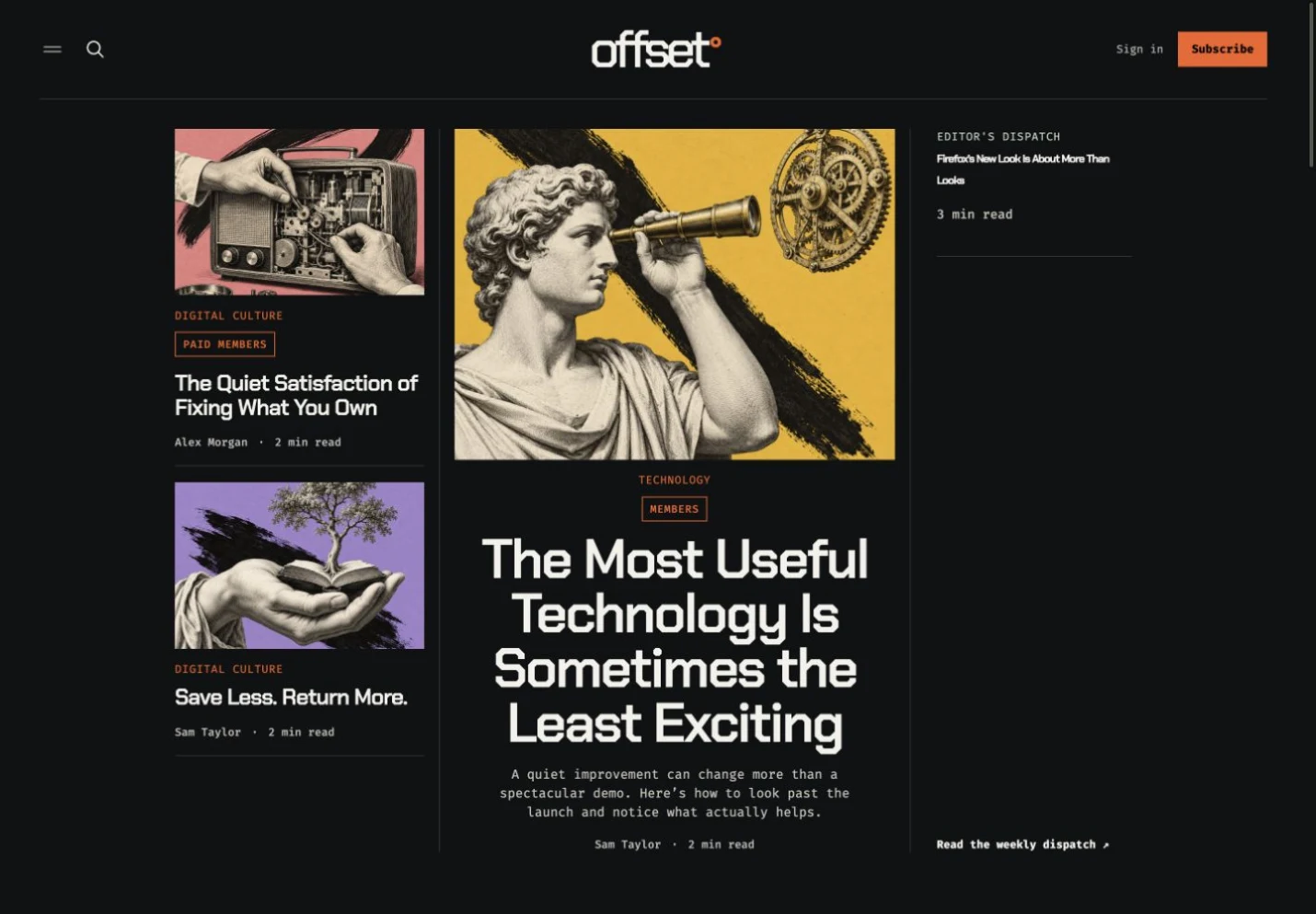
The opening story and its two supporting stories come from your three newest posts. The editor’s dispatch contains up to three featured posts. Latest displays up to five newest posts. Below these, Offset builds topic sections from public tags that have published articles.
A story can appear in several sections. Featured status adds it to the dispatch; it does not pin it as the main lead story. There is no manual homepage article picker.
Find the right guide
- Installation: upload the correct ZIP and preserve your existing routes.
- Branding and navigation: logo, typography, accent color, and menus.
- Homepage: lead stories, dispatch, topic sections, and the Report banner.
- Theme settings: every Offset setting, its default, and its effect.
- Publishing: article images, tags, headings, authors, and editor cards.
- Memberships: Portal, paid content, newsletters, and membership pages.
- Customization: CSS, translations, and advanced changes.
- Updates: backup, install, verify, and roll back.
- Troubleshooting: diagnose missing sections, signup issues, and layout problems.
Compare with the demo
Open the live Offset demo to compare layouts. Your own site will reflect your articles, tag names, imagery, navigation, and membership settings. A new publication shows an empty-content message until posts are published.
Use the live demo to compare your settings with a working Offset site.